Plugin in admin panel to create line numbering, toolbar and etc.

Which plugin for admin panel, allows users to conveniently create line numbering, a toolbar and colored tag styles (e.g., prism.js) in the Edit theme files?
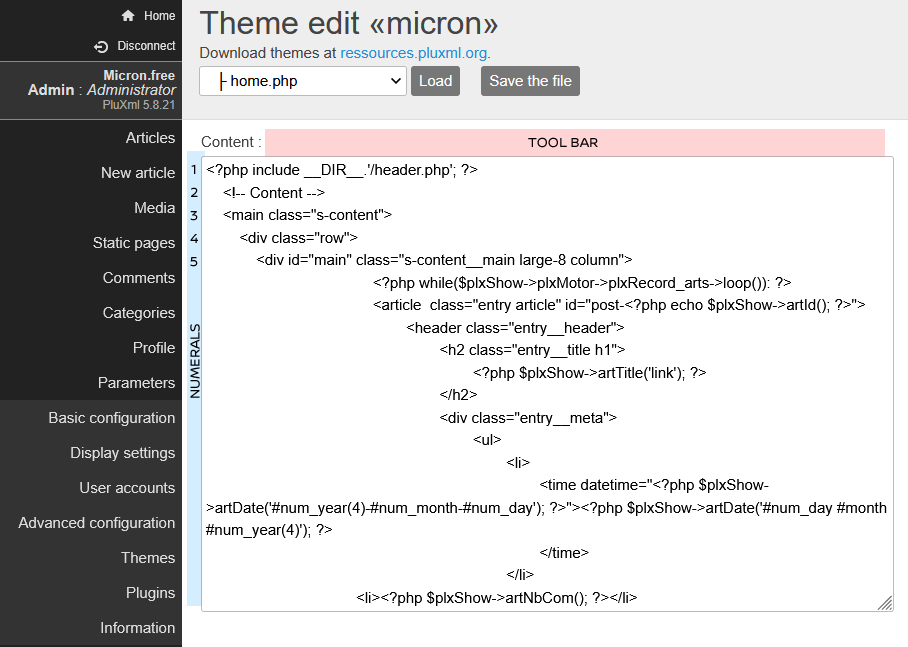
My website micron free. Free hosting: infinityfree.com | php 8.3.27.
Mots clés:
Connectez-vous ou Inscrivez-vous pour répondre.
Réponses
Hello,
Maybe kzCodemirror plugin can help you
Accès à mon dépôt de plugins et thèmes
installe PluXml plus vite que ton ombre avec kzInstall2
Errors appear in the kzCodemirror plugin. Possibly PHP 8.3 does not support it.
I tried connecting CodeMirror directly to the PHP file (/core/admin/parametres_edittpl.php). I used a hook on JS for textarea (textarea in id="id_content"). As a result, only line numbering works. That's good. The highlighs is temporarily not working. The height of the textarea has decreased. That's not good.
Please help me improve it!
Edit file parametres_edittpl.php (PHP) - Download parametres_edittpl.php.
1. This code for connecting JS and CSS is placed at the top of the page:
<!-- CODEMIRROR CSS, JS -->2. This JS code is placed at the bottom of the page:
<!-- CODEMIRROR HOOK JS -->On this forum very strange add the code. The text is large, but I did not change the font size.
My website micron free. Free hosting: infinityfree.com | php 8.3.27.
kzCodemirror plugin is working well with PluXml-5.8.21 and PHP-8.4.14 ( Ubuntu - LTS )
Otherwise your suggestion for parametres_edittpl.php is wrong.
Links for CSS stylesheets must be set after include top.php.
PHP mode has multiple dependencies. See https://codemirror.net/5/mode/php/
To change height of the textarea use .CodeMirror class.
So change the parametres_edittpl.php code as follows :
Accès à mon dépôt de plugins et thèmes
installe PluXml plus vite que ton ombre avec kzInstall2